---
title: How do I upload and store CE certificates?
description: Have a hard time tracking your CE? Never again stress over lost CE certificates!
---
[Skip to content](https://help.vetgirlontherun.com/knowledge/how-do-i-upload-ce-certificates-for-tracking-updated#main-content)
English
Show submenu for translations
[More support](https://help.vetgirlontherun.com/knowledge/kb-tickets/new?hsLang=en)

Open main navigation
Close main navigation
- English
Show submenu for translations
- [More support](https://help.vetgirlontherun.com/knowledge/kb-tickets/new)
- Go to vetgirlontherun.com
Go to vetgirlontherun.com
How can we help?
- There are no suggestions because the search field is empty.
1. [Help Center](https://help.vetgirlontherun.com/knowledge?hsLang=en)
2. [CE Credit](https://help.vetgirlontherun.com/knowledge/ce-credit?hsLang=en)
# How do I upload and store CE certificates?
## Have a hard time tracking your CE? Never again stress over lost CE certificates!
VETgirl is an all-inclusive continuing education (CE) management system, uniquely designed for our community of veterinary professionals. Regardless of the source, VETgirl's unique CE tracking system allows you to upload all your CE certificates and provides a simple and comprehensive way to store, search, and retrieve your CE certificates!
**NB:** Beginning in September 2022, all CE credit certificates earned with VETgirl are added automatically to your My Credits page.
---
### Upload CE Certificates
---
You can upload your CE certificates from any source (or pre-September 2022 VETgirl live webinar certificates) using the VETgirl CE Upload Tool:
#### **STEP 1: [Log in](https://vetgirlontherun.com/faq-login-issues-how-do-i-login/?hsLang=en) to the VETgirl website**
At minimum, you must be at least a (free) [Basic member](https://vetgirlontherun.com/pricing/?hsLang=en) to set up and access your My Credits page. This is to ensure that your uploaded certificates are associated with your personal, private account.
#### **STEP 2:** **Navigate to the My Credits tab of your MyVETgirl dashboard**
At the top right corner of your screen, click on your name to open your account directory. Click on [My Credits](https://vetgirlontherun.com/my-credits/?hsLang=en). All previous CE credits obtained / uploaded will appear in your My Credits page.
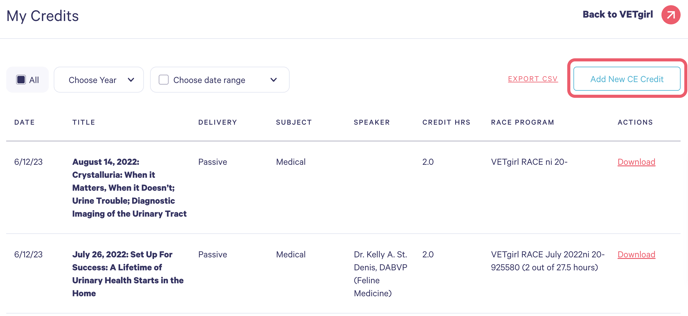
#### **STEP 3:** Click **Add New CE** **Credit** from the top right of your screen
#### **STEP 4:** **Fill out the form fields as listed**
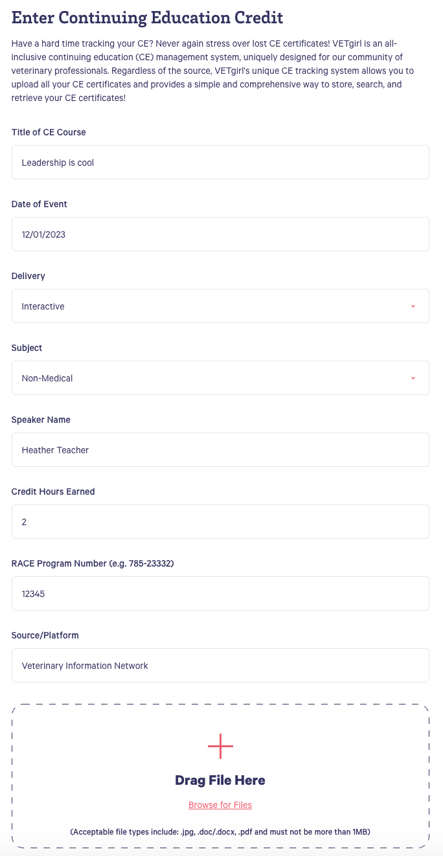
**Title of CE course:** This is an open text field
**Date of Event:** Clicking on this field will pull up a calendar
**Type of CE:** Select Interactive or Passive from the dropdown field
**Speaker Name:** This is an open text field
**Credit hours earned:** Type the number or use the arrows to add in 0.5 hour increments
**Race Program:** This is an open text field
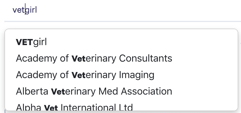
**Source/Platform:** We have a list of [750 RACE-CE Providers](https://vetgirlontherun.com/race-provider-dropdown-list/?hsLang=en). As you begin to type the name of the provider, the list to choose from will appear:
#### **STEP 5:** **Upload your certificate**
Drag your file or click Browse to select a file from your computer. *Please note the file requirements!*
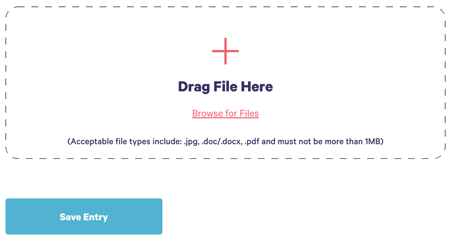
Click **Save Entry** to finalize the upload.
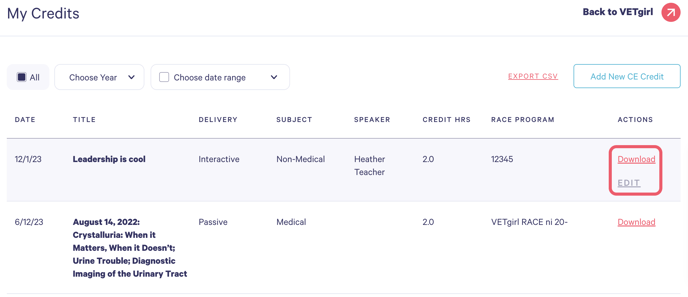
You will be re-directed back to your credit dashboard where the CE will appear in date-chronological order, the most recent at the top. Following the upload, you can edit the details as needed, download your certificate at any time or even delete the entry:
---
Please [contact us](https://vetgirlontherun.com/contact?hsLang=en) with any questions!
- [General](https://help.vetgirlontherun.com/knowledge/general?hsLang=en#main-content)
- [Account Management](https://help.vetgirlontherun.com/knowledge/general?hsLang=en#account-management)
- [Billing](https://help.vetgirlontherun.com/knowledge/general?hsLang=en#billing)
- [Help & Resources](https://help.vetgirlontherun.com/knowledge/general?hsLang=en#help-resources)
- [Membership](https://help.vetgirlontherun.com/knowledge/membership?hsLang=en#main-content)
- [ELITE Membership](https://help.vetgirlontherun.com/knowledge/membership?hsLang=en#elite-membership)
- [Discounted Memberships](https://help.vetgirlontherun.com/knowledge/membership?hsLang=en#discounted-memberships)
- [Complimentary Memberships](https://help.vetgirlontherun.com/knowledge/membership?hsLang=en#complimentary-memberships)
- [Academic & Student Memberships](https://help.vetgirlontherun.com/knowledge/membership?hsLang=en#academic-student-memberships)
- [Team Membership](https://help.vetgirlontherun.com/knowledge/team-membership?hsLang=en#main-content)
- [Team Organizers - Team Management](https://help.vetgirlontherun.com/knowledge/team-membership?hsLang=en#team-organizers-team-management)
- [Team Organizers - Team Assignments](https://help.vetgirlontherun.com/knowledge/team-membership?hsLang=en#team-organizers-team-assignments)
- [Team Members](https://help.vetgirlontherun.com/knowledge/team-membership?hsLang=en#team-members)
- [CE Credit](https://help.vetgirlontherun.com/knowledge/ce-credit?hsLang=en#main-content)
- [Certificate Programs](https://help.vetgirlontherun.com/knowledge/ce-credit?hsLang=en#certificate-programs)
- [Webinars](https://help.vetgirlontherun.com/knowledge/webinars?hsLang=en#main-content)
- [Live Webinars](https://help.vetgirlontherun.com/knowledge/webinars?hsLang=en#live-webinars)
- [On-Demand Webinars](https://help.vetgirlontherun.com/knowledge/webinars?hsLang=en#on-demand-webinars)
- [VETgirl U](https://help.vetgirlontherun.com/knowledge/vetgirl-u?hsLang=en#main-content)
- [Registration](https://help.vetgirlontherun.com/knowledge/vetgirl-u?hsLang=en#registration)
- [Education](https://help.vetgirlontherun.com/knowledge/vetgirl-u?hsLang=en#education)
- [Events](https://help.vetgirlontherun.com/knowledge/vetgirl-u?hsLang=en#events)
- [General Info](https://help.vetgirlontherun.com/knowledge/vetgirl-u?hsLang=en#general-info)
- [On-Site Services](https://help.vetgirlontherun.com/knowledge/vetgirl-u?hsLang=en#on-site-services)
[](https://vetgirlontherun.com/?hsLang=en)
[vetgirlontherun.com](https://vetgirlontherun.com/?hsLang=en) Help Center
[mailto:email@email.com](mailto:email@email.com)
Copyright © 2025, VETgirl