---
title: How do I cancel my ELITE Subscription?
description: "You have the flexibility to cancel your auto-renewal at any time through your account. To do this, simply follow the steps outlined below for your respective membership tier. NOTE: Please note that ca"
---
[Skip to content](https://help.vetgirlontherun.com/knowledge/how-do-i-cancel-auto-renewal#main-content)
English
Show submenu for translations
[More support](https://help.vetgirlontherun.com/knowledge/kb-tickets/new?hsLang=en)

Open main navigation
Close main navigation
- English
Show submenu for translations
- [More support](https://help.vetgirlontherun.com/knowledge/kb-tickets/new)
- Go to vetgirlontherun.com
Go to vetgirlontherun.com
How can we help?
- There are no suggestions because the search field is empty.
1. [Help Center](https://help.vetgirlontherun.com/knowledge?hsLang=en)
2. [General](https://help.vetgirlontherun.com/knowledge/general?hsLang=en)
3. [Billing](https://help.vetgirlontherun.com/knowledge/general?hsLang=en#billing)
# How do I cancel my ELITE Subscription?
## You have the flexibility to cancel your ELITE Subscription's auto-renewal at any time through your account.
📝**Please note:**
- Canceling your auto-renewal does **not** result in an immediate termination of your subscription. Instead, your subscription will remain active until one year after your last payment. For instance, if you made a payment for your subscription on March 1, 2025, and you cancel the auto-renewal, your subscription will continue until March 1, 2026, at which point it will expire.
🗂️ **Table of contents:** Skip around to just the parts you need with these links.
- [ELITE Single Cancellation on our website](https://help.vetgirlontherun.com/knowledge/how-do-i-cancel-auto-renewal#single)
- [ELITE Single Cancellation in the VETgirl vital™ iOS app (via Apple In-App Purchases)](https://help.vetgirlontherun.com/knowledge/how-do-i-cancel-auto-renewal#app-cancel)
- [ELITE Team Cancellation](https://help.vetgirlontherun.com/knowledge/how-do-i-cancel-auto-renewal#team)
- [FAQ: Subscriptions purchased in the iOS app (Apple billing)](https://help.vetgirlontherun.com/knowledge/how-do-i-cancel-auto-renewal#app-faq)
- [Who manages billing for subscriptions purchased in the VETgirl vital iOS app?](https://help.vetgirlontherun.com/knowledge/how-do-i-cancel-auto-renewal#who-ios)
- [What memberships can be purchased in the iOS app?](https://help.vetgirlontherun.com/knowledge/how-do-i-cancel-auto-renewal#what-ios)
- [Why is the subscription price higher in the iOS app than on the website?](https://help.vetgirlontherun.com/knowledge/how-do-i-cancel-auto-renewal#why-ios)
- [How do I cancel my subscription if I purchased it in the iOS app?](https://help.vetgirlontherun.com/knowledge/how-do-i-cancel-auto-renewal#how-ios)
- [How do refunds work for iOS (Apple) subscriptions?](https://help.vetgirlontherun.com/knowledge/how-do-i-cancel-auto-renewal#refund-ios)
- [I subscribed on the website — can I still use the iOS app?](https://help.vetgirlontherun.com/knowledge/how-do-i-cancel-auto-renewal#web-subscribed)
- [How do I know if my subscription is billed through Apple?](https://help.vetgirlontherun.com/knowledge/how-do-i-cancel-auto-renewal#billed-through-apple)
---
### **ELITE Single Cancellation on our website**
Go to your [Dashboard](https://vetgirlontherun.com/dashboard?hsLang=en)and click on the "My Account" tab. From there, select "[Membership](https://vetgirlontherun.com/dashboard/account/my-membership/?hsLang=en)" from the dropdown menu.
[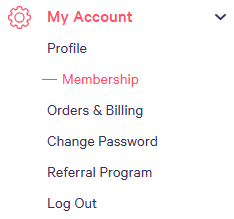](https://vetgirlontherun.com/dashboard/account/my-membership/?hsLang=en)
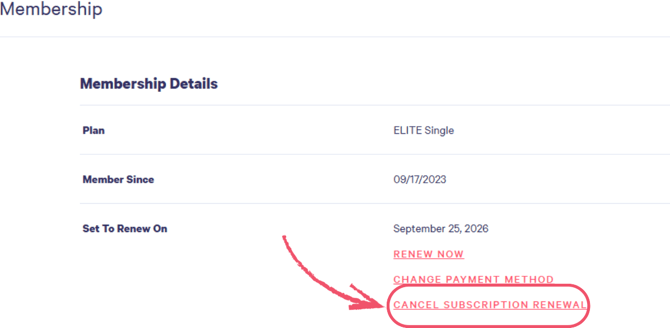
From the Membership page, select the **Cancel Subscription Renewal** option:
---
### **ELITE Single Cancellation in the VETgirl vital™ iOS app (via Apple In-App Purchases)**
⚠️Important: Apple manages all billing and subscription settings **for memberships purchased through the app**, so any cancellations need to be completed directly through your Apple account (Apple does not provide VETgirl—or any app developer—with the ability to cancel these subscriptions on your behalf).
**To cancel your iPhone/iPad subscription:**
1. Open **Settings** on your iPhone/iPad
2. Tap your **name / Apple Account** at the top
3. Tap **Subscriptions**
4. Select **VETgirl / VETgirl vital™**
5. Tap **Cancel Subscription**
---
### **ELITE Team:**
👉 Before you start: Only the Team Owner or Organizer can access this feature.
Go to your [Dashboard](https://vetgirlontherun.com/dashboard?hsLang=en)and click on the "My Team" tab. From there, select "Settings" from the dropdown menu.
**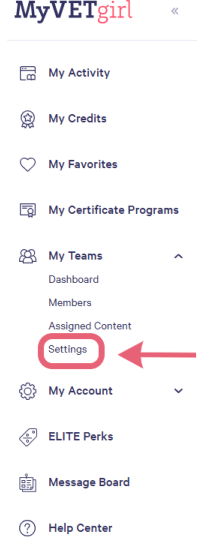**
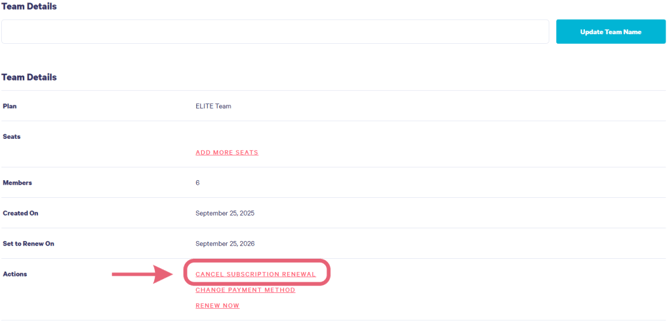
On the Settings page, select "**Cancel Subscription Renewal.**"
---
### **FAQ: Subscriptions purchased in the iOS app (Apple billing)**
#### **Who manages billing for subscriptions purchased in the VETgirl vital iOS app?**
If you purchase a membership through the **VETgirl vital iOS app**, your subscription is billed and managed by **Apple App Store billing**.
This means Apple controls subscription actions such as:
- billing and renewals
- cancellations
- refunds (when eligible)
#### **What memberships can be purchased in the iOS app?**
At this time, **only ELITE Single memberships** are available for purchase in the iOS app.
Team memberships, as well as role-based discounted and complimentary single memberships are only available when upgrading through the VETgirl website.
**If you qualify for a discount or complimentary access** (for example, veterinary technicians and military personnel), please upgrade on the website to ensure the correct pricing is applied.
#### **Why is the subscription price higher in the iOS app than on the website?**
Apple charges additional platform fees for the convenience of having your subscription managed through Apple. Because of those fees, ELITE Single membership pricing in the iOS app is higher than pricing on our website.
Your membership access is the same regardless of how you sign up; only the billing platform and price differ.
#### **How do I cancel my subscription if I purchased it in the iOS app?**
Apple subscriptions must be canceled through your iPhone/iPad subscription settings:
1. Open **settings**
2. Tap your **name / Apple Account**
3. Tap **Subscriptions**
4. Select **VETgirl / VETgirl vital**
5. Tap **Cancel Subscription**
After cancelling, you’ll keep access until the end of your billing period.
#### **How do refunds work for iOS (Apple) subscriptions?**
If you were billed through Apple, refund requests must be submitted directly to Apple:
- Visit **reportaproblem.apple.com**
- Sign in with your Apple ID
- Select the VETgirl charge and request a refund
Refund decisions are made by Apple based on their policies.
#### **I subscribed on the website — can I still use the iOS app?**
Yes! If you purchase on the website, you can still log into the iOS app and access your membership.
#### **How do I know if my subscription is billed through Apple?**
If you subscribed in the iOS app, your billing will appear in:
- Settings → Apple Account → **Subscriptions**
If you subscribed on our website, your subscription is managed in your VETgirl web account.
- [General](https://help.vetgirlontherun.com/knowledge/general?hsLang=en#main-content)
- [Account Management](https://help.vetgirlontherun.com/knowledge/general?hsLang=en#account-management)
- [Billing](https://help.vetgirlontherun.com/knowledge/general?hsLang=en#billing)
- [Help & Resources](https://help.vetgirlontherun.com/knowledge/general?hsLang=en#help-resources)
- [Membership](https://help.vetgirlontherun.com/knowledge/membership?hsLang=en#main-content)
- [ELITE Membership](https://help.vetgirlontherun.com/knowledge/membership?hsLang=en#elite-membership)
- [Discounted Memberships](https://help.vetgirlontherun.com/knowledge/membership?hsLang=en#discounted-memberships)
- [Complimentary Memberships](https://help.vetgirlontherun.com/knowledge/membership?hsLang=en#complimentary-memberships)
- [Academic & Student Memberships](https://help.vetgirlontherun.com/knowledge/membership?hsLang=en#academic-student-memberships)
- [Team Membership](https://help.vetgirlontherun.com/knowledge/team-membership?hsLang=en#main-content)
- [Team Organizers - Team Management](https://help.vetgirlontherun.com/knowledge/team-membership?hsLang=en#team-organizers-team-management)
- [Team Organizers - Team Assignments](https://help.vetgirlontherun.com/knowledge/team-membership?hsLang=en#team-organizers-team-assignments)
- [Team Members](https://help.vetgirlontherun.com/knowledge/team-membership?hsLang=en#team-members)
- [CE Credit](https://help.vetgirlontherun.com/knowledge/ce-credit?hsLang=en)
- [Webinars](https://help.vetgirlontherun.com/knowledge/webinars?hsLang=en#main-content)
- [Live Webinars](https://help.vetgirlontherun.com/knowledge/webinars?hsLang=en#live-webinars)
- [On-Demand Webinars](https://help.vetgirlontherun.com/knowledge/webinars?hsLang=en#on-demand-webinars)
- [VETgirl U](https://help.vetgirlontherun.com/knowledge/vetgirl-u?hsLang=en#main-content)
- [Registration](https://help.vetgirlontherun.com/knowledge/vetgirl-u?hsLang=en#registration)
- [Education](https://help.vetgirlontherun.com/knowledge/vetgirl-u?hsLang=en#education)
- [Events](https://help.vetgirlontherun.com/knowledge/vetgirl-u?hsLang=en#events)
- [General Info](https://help.vetgirlontherun.com/knowledge/vetgirl-u?hsLang=en#general-info)
- [On-Site Services](https://help.vetgirlontherun.com/knowledge/vetgirl-u?hsLang=en#on-site-services)
[](https://vetgirlontherun.com/?hsLang=en)
[vetgirlontherun.com](https://vetgirlontherun.com/?hsLang=en) Help Center
[mailto:email@email.com](mailto:email@email.com)
Copyright © 2025, VETgirl